
User's Manual


·After the battery scrap, not as an ordinary city garbage disposal. The correct
processing methods to consult the local regulations regarding the handling of waste
electronic products
。
The use of original accessories
·The charger: connect the ac charger and product logo in the same specified power
supply. To ensure the wire position correctly, willnot be damaged or pressure. To
avoid the risk of electric shock, please before cleaning this device, unplug it from
the power source. The charger is banned in outdoor or in damp environment use. Do
not replace the charger wire and plug.
·Battery: charge can only be between 0 ℃ to + 45 ℃ temperature. Please pull out
the charger after charging or charging cable. When the mobile phone when not in
use for a long time, please take out the battery, and place the battery in
insulation, dry and children can't touch. Only allowed to use the company's
original charger to recharge the battery. Don't squeeze the battery, don't the
battery short circuit. Don't put the battery into the fire, so as to avoid explosion
·Mobile phone in charge or for a long time will be hot in use process, which belongs
to the normal phenomenon, will not affect the service life of the equipment or
performance. If the phone is overheating, please stop the use of mobile phones for
a period of time.
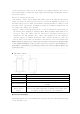
Your mobile phone
According to the key
Function
menu Click the pop-up menu function interface.
Home button Click on the return to the desktop application interface
Return key To return to the interface of highest level
The volume button
Adjust volume, ring tones, music and video of the
volume.
Power/lock screen
button screen
button
Under the conditions of normal use bright screen short press,
turn off the phone backlight; A dormant state under short
according to wake; Long press switch machine.
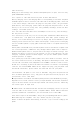
Rear cover and battery
Take down the back cover: one hand hold the fuselage side; The other hand in picking
a cock the back cover