
User Manual






www.netcommwireless.comNetComm Wireless 4GM3W User Guide
43
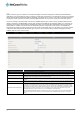
System Log
This enables you to set up the system log features of the router. You can also choose to send the system log to a remote
syslog server (via a UDP connection) or email a copy to a recipient.
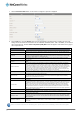
OPTION DEFINITION
IP Address for remote System Logs
(syslog)
The IP address of the syslog server where the system log data will be sent. Click the "Enable" checkbox to
enable this function.
Email address to send syslog to Click the “Enable” checkbox to enable this function.
SMTP Server : port Enter the IP address or fully qualified domain name (FQDN) and port for the selected email server.
SMTP Username The SMTP username required to send email (if required).
SMTP Password The SMTP password required to send email (if required).
Email Addresses Enter the email addresses to send a copy of the current syslog to.
Email Subject Enter the email subject to show on any sent emails.
View Log… View the current system log.
Email Log Now Email the current syslog to the entered email addresses.