
User Manual






www.netcommwireless.comNetComm Wireless 4GM3W User Guide
45
QoS
Quality of Service (QoS) is a collection of network technologies which allow configuration of different prioritiesfordifferent
applications, users or data flows in order to guarantee a certain level of performance. The ultimate goal of QoS is to guarantee
that the network delivers predictable results for availability, throughput, latency and error rate. QoS is especially important in
ensuring the smooth operation of real-time streaming applications such as Voice over IP (VoIP), IPTV and online games.
As part of a strategy to provide Quality of Service, the 4GM3W supports Type of Service (ToS), the Differentiated Services
(DiffServ) architecture and IEEE P802.1p priority tags (specified in the IEEE 802.1Q standard). DiffServ is a mechanism for
classifying and managing network traffic by marking each packet on the network with a Differentiated Services Code Point
(DSCP) which is a field in an IP packet used for classification purposes and operates at the IP layer. The 4GM3W also
supports 802.1p priority tags which operate at the media access control (MAC) level. ToS, like DSCP, is a field in the header
of IP packets that marks packets with different types of service such as minimize delay, maximize throughput, maximize
reliability, minimize cost or normal service.
OPTION DEFINITION
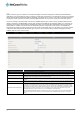
QoS Use the drop down list to Enable or Disable QoS.
WAN Interface Use the drop down list to select the interface to which QoS should apply.
QoS Mode
Use the drop down list to select the type of QoS to apply. Smart-QoS lets the router decide on the best settings
based on the types of service you select below and the percentage setting assigned to each type of service. Higher
percentages give a higher quality of service for that service type.
Bandwidth of Upstream
Enter the upstream bandwidth in Kilobits per second of your connection so that the router can calculate the best QoS
settings.
Bandwidth of Downstream
Enter the downstream bandwidth in Kilobits per second of your connection so that the router can calculate the best
QoS settings.
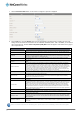
Flexible Bandwidth Management
In Smart-QoS mode, when Flexible Bandwidth Management is enabled, you are able to select certain types of traffic
to prioritise. The bandwidth allocated to each type of traffic is automatically divided by the number of types selected,
for example, if you select “Game”, “VoIP” and “Video”, the router reserves 10% of bandwidth for other types of traffic
and splits the remaining 90% of bandwidth equally among the 3 selected types, allowing each type 30% of bandwidth
when each type of traffic is concurrently in use. If, for example, only two types of that traffic are in use, the 30%
bandwidth allocated to the type of traffic not in use is re-distributed to other applications.
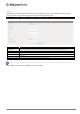
When Flexible Bandwidth Management is disabled, you are able to manually specify the percentage of bandwidth to
allocate to each type of traffic, however, you must still allow for 10% of bandwidth to be reserved for other types of
traffic.