
User Manual





26
NetComm Wireless 4GM3W User Guidewww.netcommwireless.com
the Status-page.
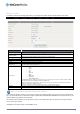
Keep Alive
There are three keep alive options to select from:
Disable:
Disable the keep alive function.
LCP Echo Request:
The 4GM3W will automatically verify the connection is active. Set the interval
and Max. number of failures to determine when the connection is up or down.
Ping Remote Host:
The 4GM3W will ping the chosen host IP to verify the connection is active. Set
the host IP address and the interval between ping tests.
Multicast Allows you to select the method of multicast or disable it.
IGMP Snooping
Allows you to enable or disable IGMP Snooping. IGMP Snooping configures the router to listen to IGMP
conversations between hosts and routers and maintain a map of the links that need IP multicast streams.
VLAN TAG
VLAN tagging is primarily used in virtual networks which span over multiple switches. VLAN tagging involves the
router inserting a VLAN ID into a packet header in order to identify which CLAN the packet belongs to. You may
enable VLAN tagging and specify the ID with a value between 1 and 4094.
WiFi Hotspot
This WAN type turns the router into a repeater. The 4GM3W connects to a wireless access point and wireless clients connect
to the 4GM3Wfor internet access. Follow the few steps below toturn the 4GM3W into a WiFi Hotspot.
If choosing WiFi HotSpot WAN type, the channel of the wireless network will be set to the same channel as used on
the remote access point.
Step 1:
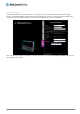
Click theChoose other Wi-Fi HotSpot button to search for any available WiFi hotspots or WiFi Access Points nearby.
Step 2:
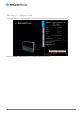
After searching, a list of the all available WiFi Access Points around you is shown. Select the appropriate Wireless network
and click the Select button to start the connection or press Refresh button to search again.