
User's Manual

Wireless AP User Manual
- 8 -
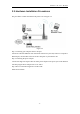
2.3. Hardware Installation Procedures
The procedures to install the Wireless AP please refer to Figure 2-3
Figure 2-3
Step 1 connecting your computer to the LAN port.
Attach one end of the Ethernet cable with RJ-45 connector to your hub, switch or a computer’s
Ethernet port, and the other end to one of the LAN ports of your Wireless AP
Step 2 connecting the power adapter.
Connect the single DC output connector of the power adapter to the power jack on the Wireless
AP. Then plug the Power Adapter into an AC outlet.
Step 3 Power on the following devices in this order:
Wireless AP and PCs