
User's Manual

Wireless Broadband Router User Manual
Page 5 of 40
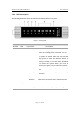
1.4.2 LED Description
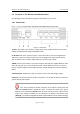
The following illustration shows the Wireless Broadband Router front panel:
Figure - 2 front panel
Number LED Light Status Description
1 PWR ON This indicator lights green when the Wireless
Router is receiving power; otherwise, it is off.
2 CPU ON The LED will be dark for a few seconds when
the system is started. After that, the LED will
stays green to show the Wireless Router is
working normally. If the LED stays blink/dark
that means the system failed, you need to
contact your agent or try to reboot the system.
3 WLAN RX Flashing Wireless LAN has Activity (ACT) data being
sent.
4 WLAN TX Flashing Wireless LAN has Activity (ACT) data being
Received
5 WAN ON WAN is connected
Off No WAN connection
Flashing WAN port has Activity (ACT), data being sent
6 LAN(1-4) ON WAN is connected
Off No WAN connection
Flashing WAN port has Activity (ACT), data being sent