
User's Manual

Wireless Broadband Router User Manual
Page 6 of 40
Chapter 2. Designing Wireless Network
2.1 System Requirements
z Broadband Internet Access Service(DSL/Cable/Ethernet)
z 10/100Base-T Ethernet card and TCP/IP protocol installed for each PC
z Internet Explorer 5.0 or higher for Web configuration
z 802.11n , 802.11g or 802.11b compliant wireless adapters (for wireless connection)
2.2 Hardware connection
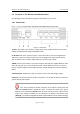
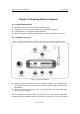
Figure - 3 Local Area Network below shows a typical setup for a Local Area Network (LAN).
Figure - 3 Local Area Network
z Begin by finding a good place to set up your wireless broadband. You should:Keep the
access point as central in your work area as possible. Signal strength and speed fall off
with distance.
z Higher is often better. For instance, set it up on the top shelf of a bookcase rather than
the bottom one, if possible.
Prior to connecting the hardware, make sure to power off your ethernet device, Cable/ADSL
modem and Wireless Broadband Router. Then follow the steps below to connect the related