
User's Manual

Wireless Broadband Router User Manual
Page 8 of 40
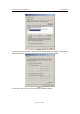
Search Order box by selecting them and clicking Remove. Click Disable DNS.
10. Click OK, back to Network Configuration dialog box
11. Click OK, if prompted to restart, click YES.
2.3.1.2 Windows 2000
Please follow the steps below to setup your computer:
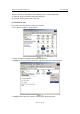
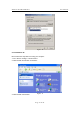
1. Go to Start Æ Settings Æ Control Panel
Figure - 4
2. Double click the icon Network and Dial-up Connections
3. Highlight the icon Local Area Connection, right click your mouse, click Properties
Figure - 5
4. Highlight Internet Protocol (TCP/IP), and then press Properties button