
Monitor User Manual 2907

NTI RACKMUX RACKMOUNT KVM DRAWER WITH SUN USB KEYBOARD
2
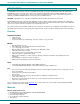
FEATURES AND FUNCTIONS
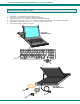
1. LCD Display- For viewing video signal from video source
2. Keyboard- For user interface with CPU or attached KVM switch
3. Trackball w/ 3 Buttons- For user interface with CPU or attached KVM switch
4. USB Cable-w/ male Type A connector- for connection of trackball and keyboard to CPU or attached KVM switch
5. Video Cable- w/ male 15HD connector- for connection of monitor to video source
6. Power supply- Cable for attachment of power
ENTER
RETURN
SHIFT
CAPS LOCK
ESC
BACKSPACE
F1
F2 F3 F4 F5 F6
F7 F8 F9 F10
F11 F12
PAUSE
DELETE
INS
SCRL
LOCK
STOP
PRINT
SCRN
NUM
LOCK
HELP /
*
-
+
.
DEL
HOME
PG UP
PG DN END
INS
789
654
123
0
PASTE
+
=
~
`
)
0
(
9
*
8
&
7
^
6
%
5
$
4
#
3
@
2
!
1
SHIFT
ALT
GRAPH
CTRL ALT
COM-
POSE
CUT COPY
?
/
>
.
<
,
:
;
"
'
}
]
{
[\
Q
WER
T
YUIOP
ASDFGH JKL
Z X CV BN M
1
3
2
Front View
RACKMUX-US17
4
5
6
Rear View
RACKMUX-US17