
User guide



- 10 -
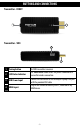
RECEIVER
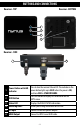
BUTTON OSD OSD DISPLAY
POWER
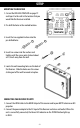
Press the POWER button on TOP of the receiver to go
from " Active mode" to " Active Standby mode".
INFO
Press the INFO button on TOP of the receiver. The
Signal Quality, Source, Channel and Resolution will be
displayed on the OSD for your reference. Press the INFO
button again to exit.
HDMI
CH10
1280x1024
= OFF
SETUP
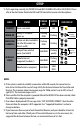
AUDIO BIT RATE SUPPORT
• Digital Audio from HDMI inputs: Up to 6Mbit/s bit-rate support.
• Support AC3 and DTS.
• 2-Channel PCM audio : 16~24 bits audio sample with 32~48KHz sampling rate
2 CHANNEL
PCM
32KHZ 44.1KHZ 48KHZ 96KHZ
16 Bits
YES YES YES YES
24 bits
YES YES YES YES
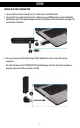
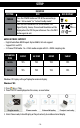
Windows OS Display setting of Laptop for external display:
Windows7 OS:
1. Press
key + P key
2. There is a POP icon displayed on the screen, as seen below :
3. Select Clone mode, Extend Display or Project out only to enable external display.