
- Omnitron Systems Technology, Inc. Media Converter and Network Interface Device User Manual

2.0 PORT STRUCTURE
2.1 OVERVIEW
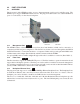
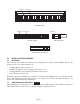
The front panel of the 2FXM2 provides access to the management (serial console) and fiber ports. The
SFP fiber ports support 100BASE-FX transceivers. The plug-in module features two additional Ethernet
ports for connectivity via the chassis backplane.
2.1.1 Management Port
PI SA
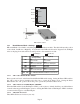
The 2FXM2 features a Serial RS-232 Console Port (aka Craft Interface) which can be connected to a
computer for initial setup and configuration. The Serial Console Port is accessed through the mini DIN-6
female DCE interface. Connect the interface to a computer’s DB-9 serial port using the mini DIN-6 male
to DB-9 female cable adapter (Part # 8082-0), which is included with the 2FXM2.
An optional DB-9 male to female straight-through serial cable is available for extension (Part # 8081-3).
2.1.2 Fiber Ports
PI SA
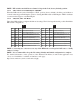
The fiber interfaces support the 100BASE-FX protocol. The fiber interfaces operate in manual mode and
support half or full duplex operation. The fiber ports can be enabled or disabled via network management.
A port disabled with the Port Access Control feature will still connect and allow 802.3ah OAM or IP-less
(secure) OAM communication, but blocks normal data traffic.
2.1.3 Backplane Ethernet Ports
PI
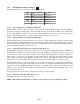
The plug-in module supports two additional 10/100Mbps Ethernet Backplane Ports. The Backplane Ports
A and B allow Ethernet data connectivity between adjacent modules in an iConverter chassis. The two
backplane ports can be disabled or enabled via a DIP-switch or network management.
The iConverter 19-Module, 5-Module, 2-Module and 1-Module Redundant Chassis backplanes provide
ethernet data connectivity between adjacent slots or ports. The A and B backplane ports connect the slots
as illustrated.
Page 4