
Manual


- 4 -
- 5 -
ENGLISH FRANÇAIS DEUTSCH ITALIANO ESPAÑOL
5
[m]
2
0
[ft.]
0
10
413
0 10 20 30
0 10 20 30 40 50 60 70 80 90 100 110 120 130[ft.]
40 [m]
00
0 10 20 30
0 10 20 30 40 50 60 70 80 90 100 110 120 130[ft.]
40 [m]
[m]
2
[ft.]
10
413
DWN
UP
DWN
UP
Sens.Select.SW.Sens.Select.SW.
Far areaFar area Near areaNear area
FUNCTION SETTING
Applicable models
SIP-3020WF SIP-4010WF SIP-404WF
Sens.Select.SW.Sens.Select.SW.
Far areaFar area Near areaNear area
UP DWN
Cautions>>
If the red LED keeps blinking for approx. 120 seconds
after turning the power on, turn the power off and then
on again.
5-1
Sensitivity Selector Switch for Near and
Far Area
Applicable models
SIP-3020WF SIP-4010WF SIP-404WF
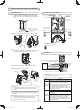
You can change the sensitivity for far area detection and near
area detection independently.
SELECTOR
POSITION
FUNCTION
SH
Suitable for sites requiring a
level of sensitivity higher than
“H”
H
Suitable for sites requiring a
level of sensitivity higher than
“M”
M
(Factory
default)
Suitable for standard
applications
L
Suitable for hostile and narrow
area
5-2
Detection Logic Selector Switch
Dip switch 1
Applicable models
SIP-3020WF SIP-4010WF SIP-404WF
The near area sensor has two dual-element devices, and
it covers two types of plane areas alternately using the two
devices.
SELECTOR
POSITION
STATUS
FUNCTION
UP
OR
Factory
default
A sensor signal is output when an
object is detected in either of the two
detection areas.
* Use this mode when you adjust
the detection area. Switch to AND
mode after you have finished the
detection area adjustment.
DWN AND
Use this mode to reduce instances
of incorrect detection of objects. The
sensor signal is output only when
an object is detected within the two
detection areas. If any objects are
blocking multiple detection areas,
use OR mode.
5-3
Detection Range Selector Switch
Dip switch 2
SELECTOR
POSITION
STATUS
FUNCTION
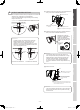
UP OFF
Cancels the far area detection. The
detection area is reduced as shown
below.
DWN
ON
Factory
default
Enables the far area detection.
Applicable models
SIP-3020WF SIP-4010WF SIP-404WF
Applicable models
SIP-3020WF SIP-4010WF SIP-404WF
Cautions>>
If you cancel the far area detection, the detection
distance is limited to approximately 20 meters (65ft.). Be
sure to readjust and check the detection area using the
area viewfinder and the walk tester.
Cautions>>
When you are checking the detection area, take care not
to cover the shaded area of the window with the walk
tester or its cable. If infrared beams to the sensor are
partially shielded, the detection sensitivity will drop and
the detection operation may fail.
If it is difcult to detect an object>>
1. Set the detection logic switch to the “OR” position (see
Step 5-2).
If the sensor is OK when you have completed the walk
test, return the logic switch to the “AND” position.
2. Adjust the sensor sensitivity switch (see Step 5-1).
To mask the detection area>>
Detection
area
How to mask the area Reference
Far area
Use the switch. 5-3
Use the masking plate (mounted
in the main unit).
Step 7
Near
area
Use the masking plate (mounted
in the main unit).
8-1
Attach the masking seal (an
accessory) to the area mirror
surface.
8-2
5-4
Alarm Interval Switch
Dip switch 3-4
Applicable models
SIP-3020WF SIP-4010WF SIP-404WF
You can set an interval (4 different times) to suspend the alarm
signal output.
For example, if you set this interval to 60 seconds, no more
alarm signals will be output for 60 seconds after the output
of the first alarm signal. It works to avoid frequent outputs to
save battery life. If no pedestrians are detected for more than
60 seconds, the system returns to the standby mode.
Then, when a pedestrian is detected, the alarm signal will be
output.
SELECTOR
POSITION
FUNCTION
0 sec
(Factory
default)
5 sec
60 sec
150 sec
Cautions>>
The alarm interval is set to 0 sec as a factory default to
allow the detection area to be correctly recognized for the
Walk-test. Set the alarm interval switch after adjusting the
detection area.
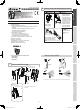
( )
( )
Near area sensitivity
selector switch
Far area sensitivity selector
switch
Walk tester
connector
Tamper
switch
Operation indicator
(See Step 11.)
1: Detection logic selector
(AND or OR)
2: Detection range selector
switch
3,4: Alarm holding time selectors
Far area detection is canceled.
Far area detection is canceled.
REDWALL-V_SP-WF_EN.indd 5 2009/05/25 15:24:17