
Installation Instruction

PREPARATION
1. Shut o the power at the circuit breaker and remove existing xture, including the crossbar.
2. Carefully unpack your new xture and lay out all the parts on a clear area. Be careful not to lose any small parts necessary for installation.
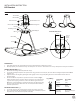
CONNECTING THE WIRES (Fig. 2)
3. Remove the mounting screws (C1) from the canopy.
4. Secure the mounting back plate to the junction box using junction box screws (B1). The side of the mounting back plate marked “GND”
must face out.
5. Adjust the xture wire length by pushing the cable gripper on the canopy and pulling the wire as desired. Make sure the wires are
the same length.
6. Connect the Driver’s input wires to junction box wires as shown in Fig. 2,
making sure that all wire connectors (A1) are secured. If your outlet box has
a green or bare copper ground wire, connect the xture’s ground wire to it.
Otherwise, connect the xture’s ground wire directly to the back plate using
the green screw provided. After wires are connected, tuck them carefully
inside the junction box.
MOUNTING THE FIXTURE (Fig. 1)
7. Secure the canopy to the mounting plate using the mounting screws (C1).
8. There is optional metal clip in hardware bag, remove the screws (D1) to replace
the plastic clip, secure the metal clip with screws (D1).
Fixture Wires
Black or
Smooth
Fixture Wires
White or
Ribbed
Fixture Wires
Bare wire
(Ground)
House Wires
Black
(Hot)
House Wires
White
(Neutral)
House Wires
Green or Bare Copper
(Ground)
Fig. 2 Wiring
G
N
D
Ground Wire Screw
Mounting Plate
Cable Gripper
Back Plate Dimensions
Wire Connector
Junction Box Screw
Mounting Screw
Screw
Driver
Plastic Clip
Canopy
Junction Box
Ground Wire
A1
B1
C1
D1
1 3/4"
1 3/8"
FIG. 1
INSTALLATION INSTRUCTION
LED Pendant
Ø
6 3/16"
Ø
6 3/4"
Ø
6 3/4"
2