
User Manual


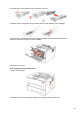


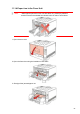
Table Of Contents
- Preface
- Legal Notice
- Safety Precautions
- Precautions
- Legal Information
- Table of Contents
- 1. Before Using the Printer
- 2. Paper and Print Media
- 3. Driver installation and uninstallation
- 4. Wired network setup (applicable to wirednetwork models)
- 5. Wireless network setup (applicable to Wi-Fi models)
- 6. Web server
- 7. Print
- 8. Mobile Print
- 9. General Settings
- 10. Routine Maintenance
- 11. Troubleshooting
- 12. Menu Structure
- 13. Product Specifications

Toner cartridge replacement steps:
1.Power off the printer.
2. Open the front cover and take the laser toner cartridge out along the track.
3.
Press the blue button on the left side of drum component with left hand and lift the toner
cartridge handle with right hand at the same time to take the toner cartridge out.
4.
Open the package of the new toner cartridge and hold the toner cartridge handle to shake it
left and right for 5 – 6 times, so that the toner inside can be uniformly dispersed.
84