
- Patton Electronics Network Router User Manual
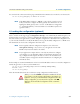
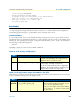
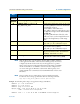

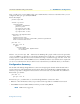
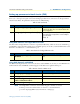

Table Of Contents
- Summary Table of Contents
- Table of Contents
- List of Figures
- List of Tables
- About this guide
- Chapter 1 General information
- Chapter 2 Applications overview
- Chapter 3 SmartNode installation
- Chapter 4 Initial configuration
- Chapter 5 G.SHDSL Basic Configuration
- Chapter 6 Contacting Patton for assistance
- Appendix A Compliance information
- Appendix B Specifications
- Appendix C Cabling
- Appendix D Port pin-outs
- Appendix E SmartNode 4950-NCE factory configuration
- Appendix F End user license agreement

Bootloader 34
SmartNode 4950-NCE Getting Started Guide 4 • Initial configuration
Using default protocol (TFTP)
-
Raw file loaded 0x01800100-0x0199ca6b, 1689964 bytes, assumed entry at 0x01800100
RedBoot> fis delete -n 1
Delete image 1 - continue (y/n)? y
... Erase from 0x60030000-0x601cc974: ..........................
RedBoot> fis create
Use address 0x01800100, size 1684402 ? - continue (y/n)? y
... Erase from 0x60030000-0x601cb3ba: ..........................
... Program from 0x00011eec-0x00011ef4 at 0x60030000: .
... Program from 0x01800100-0x0199b4b2 at 0x60030008: ..........................
... Program from 0x00011eec-0x00011ef4 at 0x60030000: .
Image successfully written to flash
RedBoot> fis list -l
Id Address Length State Description
Entry Load Addr Version
--------------------------------------------------------------------
1 0x60030000 1693438 valid SmartWare R5.T BUILD28015
0x01800100 0x01800100 V5.T
RedBoot> go
Starting 'SmartWare R5.T BUILD28015' at 0x01800100 via 0x01800100
Load a new application image (SmartWare) via the serial link
The Bootloader supports the ‘X-Modem’ and ‘Y-Modem’ protocols to download application images via the
serial link of the console. Do the following to initiate the download:
Step Command Purpose
1 RedBoot> load -r -v -m {
xmodem | ymodem } -b
base_address
Downloads an application image into the volatile memory
(RAM) from where the SmartNode could directly execute it.
‘xmodem’ or ‘ymodem’: Specify the protocol to be used, X-
Modem or Y-Modem
base_address: memory location where to store the application
image. Use the default address 0x1800100
Execute the above RedBoot command first, then start the trans-
fer from the terminal program with the command ‘Send file via
X-Modem’ (or similar).
5 RedBoot> fis delete -n 1 Deletes the first application image.
Reply with ‘y’ to the confirmation request.
6 RedBoot> fis create Stores the downloaded application image to the permanent
memory (flash:).
Reply with ‘y’ to the confirmation request.
7 RedBoot> fis list -l Checks whether the image has been successfully stored,
whether it is the desired Release and Build, and whether it is
valid.