
Operations Manual MONITOR VS15XAD



Operations Manual (OM705-00)
8
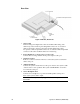
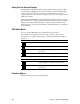
Rear View
Figure 2: Monitor, Rear Ports
1.
Video Cable
Both an analog and a digital video cable are included. The analog video
cable incorporates a male 29 pin locking DVI connector at one end and a
male 15-pin D-sub connector at the other end. The digital video cable
incorporates a male 29-pin DVI connector at one end and a male 24-pin DVI
connector at the other end. Both cables are 2 meters long.
2.
Power Input Port
(locking/latching mini-Din 4-Pin)
Connect the low-voltage cable from the power adapter to this port.
3.
Touchscreen Port
If this is a resistive touchscreen monitor, connect the system’s touchscreen
cable to this port.
4.
Audio Line-In Port
Connect the system’s audio lineout to this port to listen to the system’s audio
on the monitor’s stereo speakers. The system’s CD-ROM line out can also
be connected to this port.
5.
Stereo Headphone Port
Connect stereo headphones or powered external speakers to this port to
listen to the system’s audio output.
Note:
When headphones are plugged in, the stereo speakers are
turned off.