
- LX1200TI Touch Monitor USER'S GUIDE

14 LX1200TI User’s Guide (020-0512-01A)
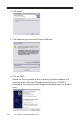
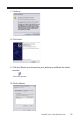
4. Click Install
5. Click continue, you can trust Planar and IRtouch
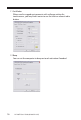
6. Click on Finish
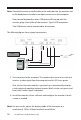
Attach the Planar monitor to the system or install the computer to a
docking station. After the USB cable from the Planar LX1200TI is
attached to the computer it will recognize the touchscreen for the rst
time.