
- LX1200TI Touch Monitor USER'S GUIDE

LX1200TI User’s Guide (020-0512-01A) 7
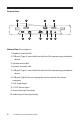
Front View (Descriptions):
1. 12.1-inch diagonal XGA screen size.
2. Programmable SoftKeys
3. Volume control
4. “All in one” power button - controls power to the remote computer
5. USB port (Type A, accessible from the front) for connecting a peripheral
device (a second connection is on the back)
6. Brightness control - allows you to easily adjust the screen to the light
condition and to quickly hide the information on the screen
(“screen blanking”)
7. Remote PC Shutdown/Start Button
8. Autosync
9. Power Indicator LED:
• Green: Power on, all systems OK
• Amber: Screen brightness turned fully down (“blanked”)
• Red: No video input
• O : DC power o
10. Touchscreen provides an intuitive software interface