
User's Manual
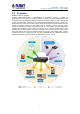
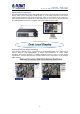
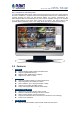
Table Of Contents
- Chapter 1. Product Introduction
- Chapter 2. Hardware Interface
- Chapter 3. Connecting to the NVR
- Chapter 4. Web-based Management
- Chapter 5. Playback Viewing
- Chapter 6. Event Viewing
- Chapter 7. NVR Setup – Device Configuration
- Chapter 8. NVR Setup -- Channel Configuration
- Chapter 9. NVR Setup -- Event Configuration
- Chapter 10. NVR Setup -- System Operations
- Chapter 11. NVR Local Interface
- 11.1 System Configuration
- 11.1.1 Service
- 11.1.2 Display
- 11.1.3 Network
- 11.1.4 User Account -- User setting
- 11.1.5 User Account -- User Group Setting
- 11.1.6 Disk
- 11.1.7 Channel Configurations -- Adding a Camera (Automatic Search)
- 11.1.8 Channel Configurations -- Adding a Camera (Add manually)
- 11.1.9 E-map
- 11.1.10 Recording
- 11.1.11 Event Setting
- 11.1.12 System Log
- 11.1.13 Maintenance
- 11.1.14 USB Backup
- 11.1 System Configuration
- Appendix A: Ping IP Address
- Appendix B: Planet DDNS Application
- Appendix C: Configuring Port Forwarding Manually

NVR-820 / NVR-1620
Network Video Recorder with HDMI
8
High Resolution Local Display
The NVR-1620/NVR-820 provides both HDMI and VGA video output interfaces for dual local
display, which can be connected to HDMI monitor or TV for doing monitoring in the full HD
(1920 x 1080) resolution, and check NVR system status on VGA monitor at the same time,
eliminating the need for a separate PC to view video from the unit. It also can be operated with
the USB keyboard and mouse to configure and monitor all the systems easily.
Performing Real-time Remote Monitoring
Up to 16/8 IP cameras can be connected to the NVR-1620/NVR-820 via a connected IP
network. With the NVR-1620/NVR-820, it delivers high performance to ensure stable
recordings and smooth playbacks of multiple megapixel cameras. Users can view remote
surveillance in real time and play back recorded videos via the web browser or the bundled
CMS software.