User guide
Manuals
Brands
Planex Manuals
Networking
SWP-0412G2
11
12
13
14
15
16
17
18
19
20
Table Of Contents
Unpacking Information
Introduction
General Description
Key Features
The Front Panel
The Rear Panel
Power Receptacle
Installation
Desktop Installation
Rack Installation
Installing Network Cables
Description of Switch Functions
Jumbo Frame
Flow Control and Backpressure
Mirror
VLAN
Trunk (Aggregation)
Quality of Service (QoS)
SNMP
Management guide
Access the Switch
Manage via Command Line Interface
Manage via Web Browser
Homepage
System
Port
VLAN
PVID
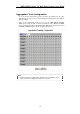
Aggregation/ Trunk Configuration
Quality of Service
Mirror
Rate Limit
SNMP
Discovery
Statistics Overview
Detailed Statistics
Restart
Factory Default
Smart Boot
Software Upload
Appendix- Command Line Interface
Start-up and Terminal configuration
Login/Logout Procedures
Command Hierarchy
Entering Commands
Command Description
System Commands
Console Commands
Port Commands
VLAN Commands
Aggregation Commands
QoS Commands
Mirror Commands
IP Commands
SNMP Commands
Ratelimit Commands
Product Specifications
SWP-0412G2 Series L2
Web Smart S
witch User Guide
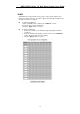
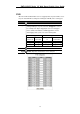
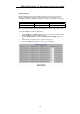
Quality of Service
QoS enhances communic
ation quality by giving precede
nce to certain classes of
packets. This switch provides port-bas
ed, tag-based and DSCP QoS modes:
17
1
...
...
15
16
17
18
19
...
...
42