
CS600 User Manual


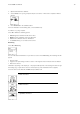
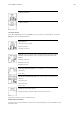
Table Of Contents
- User manual CS600
- Contents
- 1. Introduction
- 2. Cycling Computer Components
- 3. Getting Started
- 4. Prepare for Training
- 5. Training
- 6. After Training
- 7. Settings
- 8. Training Program
- 9. Tests
- 10. Using a New Accessory
- 11. Backround Information
- 12. Customer Service Information
- Index

Text on the display
Symbol Explanation
L/R balance*
Pedaling power distribution
between left and right foot in
percentage.
Zone pointer (heart rate)
If the heart symbol is not visible
and/or an alarm sounds, your
heart rate is outside the target
zone.
Zone pointer*(cadence)
If the cadence symbol is not
visible and/or an alarm sounds,
you are outside the target
cadence zone limits.
Zone pointer* (power)
If the power symbol is not visible
and/or an alarm sounds, you are
outside the target power zone
limits.
Time in zone
Time spent on the zone
* Optional sensor required.
Button Functions During Exercise
Take a Lap
Press OK to record a lap. The display will show:
Lap number
Average heart rate of the lap
Lap time
Lap number
Lap distance
Average speed
Lock a Zone
When training without preset target zones (FREE exercise), you can lock your heart rate into a sport
zone. For more information see Polar Sport Zones. This way, if you haven’t had time to define preset
target zones prior to exercise, you can set a target zone on the go during a session.
Press and hold LAP (OK) to Lock /Unlock zone.
If, for example, you are cycling with a heart rate of 130 bpm which is 75% of your maximum heart
rate, and matches sport zone 3, you can press and hold LAP to lock your heart rate into this zone. Sport
zone3 Locked 70-79 is displayed. An alarm sounds if you are below or above the sport zone (if the target
zone alarm function is on). Unlock the sport zone by pressing and holding OK again: Sport zone3
Unlocked is displayed.
Zoom the Display
Polar CS600 User Manual 16