
LCD Television User Guide FLM-2625





Setting Picture
22
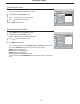
There are three preset picture modes ( and ) and one user-set
picture mode ( ). Each preset mode has its own picture settings.
: Select for a bright picture.
: Select for a finely detailed picture.
: Select for a normal picture.
Adjusted settings are stored in PERSONALmode.
BRIGHT, SOFT NATURE
PERSONAL
BRIGHT
SOFT
NATURE
You may quickly use the button on the remote control to select picture
mode.
PICTURE MODE
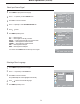
Using the Preset Picture Mode
Press to display the menupage.MENU PICTURE
1
The [PICTURE MODE] will be highlighted automatically.
3
Press to select a desired picture mode.
4
Press repeatedly to exit.MENU
Press to access the submenu.OK PICTURE
2
PICTURE
CONTRAST
BRIGHTNESS
COLOR
TINT
SHARPNESS
NOISE REDUCE
SIZE MODE
MOVE
SELECT
MENU EXIT
NATURE
WEAK
FULL
PICTURE MODE
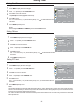
Customizing the Picture
Press to display the menu main page.MENU
1
The picture menu page will be displayed automatically.
Press to select the item you wish to change.56
3
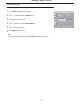
Press to adjust the value of the item.
4
Press repeatedly to exit.MENU
5
Press to access the submenu.OK PICTURE
2
PICTURE
CONTRAST
BRIGHTNESS
COLOR
TINT
SHARPNESS
NOISE REDUCE
SIZE MODE
MOVE
SELECT
MENU EXIT
NATURE
WEAK
FULL
PICTURE MODE