
LCD Television User Guide FLM-2625





Setting Picture (continued)
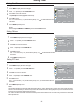
Press to display the menu main page.MENU
1
Press repeatedly to select item.SIZE MODE6
2
Press to access the submenu.OK
3
Press to select a desired aspect ratio.
4
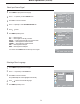
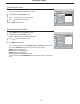
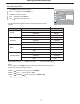
Adjusting Screen Aspect
Press to display the menu main page.MENU
1
Press repeatedly to select item.NOISE REDUCE6
3
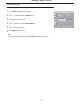
Reducing Picture Noise
4
Press to select , or .OFF WEAK STRONG
Press to access the submenu.OK
2
You may also use the button to select the aspect ratio between
and .
ASPECT
FULL, ZOOM1, ZOOM2 NORMAL
FULL
ZOOM1
NORMAL
––
––
––
––
In this mode the picture is progressively stretched toward each side of the screen.
This feature is recommended for viewing "letter-box" movie(picture with a black bar on the top and bottom). If you
watch a 4:3 picture in this mode, the picture will be expanded and some information at the top and bottom will be lost.
In this mode the picture is vertically stretched toward up side of the screen so that when viewing programs with title at the
bottom, the bottom title can be revealed.
In this mode the picture is displayed without modification, in its native aspect ratio.
ZOOM2
Sometimes a noisy picture may appear on the screen because of poor signal.
This function helps to enhance the picture quality by reducing the noise.
23
The picture menu page will be displayed automatically.
PICTURE
CONTRAST
BRIGHTNESS
COLOR
TINT
SHARPNESS
NOISE REDUCE
SIZE MODE
MOVE
SELECT
MENU EXIT
NATURE
WEAK
FULL
PICTURE MODE
The picture menu page will be displayed automatically.
PICTURE
CONTRAST
BRIGHTNESS
COLOR
TINT
SHARPNESS
NOISE REDUCE
SIZE MODE
MOVE
SELECT
MENU EXIT
NATURE
WEAK
FULL
PICTURE MODE