
LCD Television User Guide FLM-2625




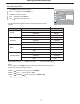

Setting Timer
NOTE:
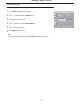
The time interval between CLOCK and TIME OFF should be above 1 minute. When the last 1 minute comes, there exit two situations.
The one is: the unit will show you after how many seconds the set will be turned off. During this period if you do not want the unit to be
turned off, press any button to exit before the unit turn off.
The other is: the OFF timer will be canceled automatically under certain conditions such as sound mute, picture freeze or other OSD
items adjustment etc.
24
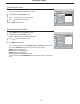
Making use of this function can set the current time for the TV.
Press to access .
Use
OK
56to set the hour (1-12) and the minute (00-59), use to switch between the hour
and minute.
4
Press repeatedly to exit.MENU
5
Setting Clock Time
Press to display the menu main page.MENU
1
Press repeatedly to select menu.FUNCTION56
2
Press to access the submenu.OK
3
The [ ] item will be highlighted automatically.CLOCK
NOTE:
Before setting the and , please set the item first.TIME ON TIME OFF CLOCK
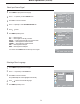
With the ON timer, the TV will automatically turn on at a preset time.
Setting ON timer
Press to display the menu main page.MENU
1
Press to select item.TIME ON6repeatedly
4
5
Press repeatedly to select .FUNCTION menu56
2
Press to access the submenu.OK
3
Press to access .
Use
OK
56to set the hour (1-12) and the minute (00-59), use to switch between the hour
and minute.
Press repeatedly to exit.MENU
6
FUNCTION
TIME ON
TIME OFF
SLEEP TIMER
CLOSED CAPTION
PARENTAL CONTROL
SELECT
MENU EXIT
AM11:22
AM--:--
AM--:--
OFF
CLOCK
MOVE
OFF
FUNCTION
TIME ON
TIME OFF
SLEEP TIMER
CLOSED CAPTION
PARENTAL CONTROL
SELECT
MENU EXIT
AM11:22
AM--:--
AM--:--
OFF
CLOCK
MOVE
OFF
POWER DOWN:
58
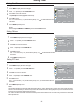
Setting OFF timer
Press to display the menu main page.MENU
1
Press repeatedly to select menu.FUNCTION56
2
Press to access the submenu.OK
3
Press repeatedly to select item.TIME OFF6
4
5
Press to access .
Use
OK
56to set the hour (1-12) and the minute (00-59), use to switch between the hour
and minute.
Press repeatedly to exit.MENU
6
With the OFF timer, the TV will automatically turn off at a preset time.
FUNCTION
TIME ON
TIME OFF
SLEEP TIMER
CLOSED CAPTION
PARENTAL CONTROL
SELECT
MENU EXIT
AM--:--
AM--:--
OFF
CLOCK
MOVE
OFF
AM--:--