
LCD Television User Guide FLM-2625
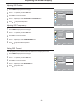

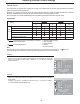

Press to display the menu main page.MENU
1
Press repeatedly to select menu.SCREEN56
2
Press to access the submenu.OK
3
Changing the Position of Image
Press repeatedly to select or item.H-POSITION V-POSITION6
4
5
Press to adjust the value of the item until the screen is well-aligned.
32
Adjusting the CLOCK and PHASE
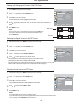
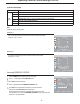
Press to display the menu main page.MENU
1
Press repeatedly to select menu.SCREEN56
2
Press to access the submenu.OK
3
Press repeatedly to select or item.CLOCK PHASE6
4
5
Press to adjust the value of the item.
Adjusting the Picture Automatically
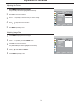
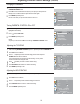
Press to display the menu main page.MENU
1
Press repeatedly to select menu.SCREEN56
2
Press to access the submenu.OK
3
Press repeatedly to select item.AUTO ADJUST6
4
5
Press to start adjusting.OK
If you are not satisfied with the picture, you may adjust the picture by using this function.
Adjustment in VGA Mode(continued)
6
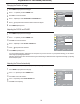
Press repeatedly to exit.MENU
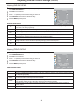
You may find that images blur, depending on the clock phase of your PC's Processor. If you experience blurring, you can obtain a
clearer image by adjusting the phase item.
Adjust the clock frequency of the set's internal clock signal. If shimmering or rainbow-like noise is apparent in the image, try adjusting
the clock frequency item.
Press repeatedly to exit.MENU
6
SCREEN
SIZE MODE
FULL
H-POSITION
V-POSITION
CLOCK
PHASE
AUTO ADJUST
MOVE
SELECT
MENU EXIT
SCREEN
SIZE MODE
FULL
H-POSITION
V-POSITION
CLOCK
PHASE
AUTO ADJUST
MOVE
SELECT
MENU EXIT
SCREEN
SIZE MODE
FULL
H-POSITION
V-POSITION
CLOCK
PHASE
AUTO ADJUST
MOVE
SELECT
MENU EXIT