
Installation Guide

ASSEMBLY INSTRUCTIONS
3.
4
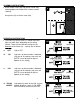
The fixture (A) can be used as a motion-activated
light or a touch light, depending on the setting
chosen. There are four different settings on the
backside of the fixture (A) -- settings are as follows:
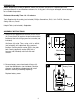
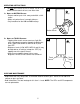
Screw fixture screw (AA) into plastic anchor (BB),
allowing about one thread of the screw to remain
showing.
Hang fixture (A) on fixture screw (AA).
BB
3
A
AA
AA
OPERATING INSTRUCTIONS
1.
1a.
Light is OFF
Light turns on when motion is detected,
stays on for 10 seconds, then turns off
[NOTE: It must be dark for light to
operate in this setting]
Light turns on when motion is detected,
stays on for 60 seconds, then turns off
[NOTE: It must be dark for light to
operate in this setting]
Light works by touch to turn ON, to cycle
through brightness levels (LOW, MED,
MED-HI and HI) and then to turn OFF
1b.
1c.
1d.
OFF
10S
60S
TOUCH
ON/OFF
1a
1b
A
(backside)
1c
1d
A
(backside)
A
(backside)
A
(backside)