User's Manual
Manuals
Brands
Pro-Nets Technology Manuals
Computers & Accessories
WIRELESS ROUTER
1
2
3
4
5
6
7
8
9
10
11
d
)
S
e
l
e
c
t
“
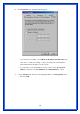
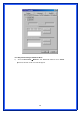
DNS Configuration
” tab and make sure select “
Enable DNS
”, enter the
DNS address provides from your ISP in the “
DNS Server Search Order
” field, then
click “
Add
”:
1
...
...
6
7
8
9
10