User's Manual
Manuals
Brands
Pro-Nets Technology Manuals
Computers & Accessories
WIRELESS ROUTER
1
2
3
4
5
6
7
8
9
10
12
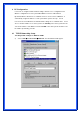
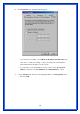
Checking TCI/IP Setting for Window
s NT4.0
a)
Select
“
Control Panel
Æ
Netw
ork
”, click “
Protocols
” tab then select “
TCP/IP
protocol
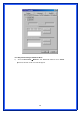
”, window shown as below will appear:
1
...
...
7
8
9
10