
User's Manual

4
4
configuration from WAN side.
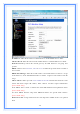
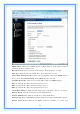
Enable IPsec pass through on VPN connection: Click the checkbox to enable
IPSec packet pass through.
Enable PPTP pass through on VPN connection: Click the checkbox to enable
PPTP packet pass through.
Enable L2TP pass through on VPN connection: Click the checkbox to enable
L2TP packet pass through.
Apply Changes: Click the
Apply Changes
button to complete the new
configuration setting.
Reset: Click the
Reset
button to abort change and recover the previous configuration
setting.
[PPPoE]
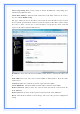
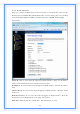
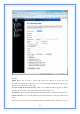
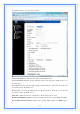
PPPoE: Click to select PPPoE support on WAN interface. There are user name,
password, connection type and idle time settings need to be done.
User Name: If you select the PPPoE support on WAN interface, fill in the user name
and password to login the PPPoE server.
Password: If you select the PPPoE support on WAN interface, fill in the user name and
password to login the PPPoE server.
Service Name: Fill in the service name of Service Name. The default value is empty.
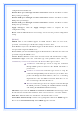
Connection Type: Select the connection type from pull-down menu. There are
Continuous, Connect on Demand
and
Manual
three types to select.
Continuous
connection type means to setup the connection
through PPPoE protocol whenever this WLAN AP Router is
powered on.
Connect on Demand
connection type means to setup the
connection through PPPoE protocol whenever you send the data
packets out through the WAN interface; there are a watchdog
implemented to close the PPPoE connection while there are no
data sent out longer than the idle time set.
Manual
connection type means to setup the connection through
the PPPoE protocol by clicking the
Connect
button manually,
and clicking the
Disconnect
button manually.
Idle Time: If you select the
PPPoE
and
Connect on Demand
connection type, fill in
the idle time for auto-disconnect function. Value can be between 1 and 1000 minutes.
MTU Size: Fill in the MTU size of MTU Size. The default value is 1400.
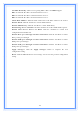
Attain DNS Automatically: Click to select getting DNS address for
DHCP
support.
Please select
Set DNS Manually
if the
DHCP
support is selected.