
User's Manual

39
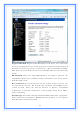
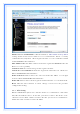
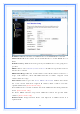
IP Address: Fill in the IP address of LAN interfaces of this WLAN Access Point.
Subnet Mask: Fill in the subnet mask of LAN interfaces of this WLAN Access
Point.
Default Gateway: Fill in the default gateway for LAN interfaces out going data
packets.
DHCP: Click to select Disabled, Client or Server in different operation mode of
wireless Access Point.
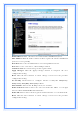
DHCP Client Range: Fill in the start IP address and end IP address to allocate a
range of IP addresses; client with DHCP function set will be assigned an IP
address from the range.
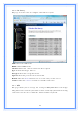
Show Client: Click to open the Active DHCP Client Table window that shows
the active clients with their assigned IP address, MAC address and time
expired information. [Server mode only]
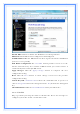
Static DHCP: Select enable or disable the Static DHCP function from pull-down
menu. [Server mode only]
Set Static DHCP: Manual setup Static DHCP IP address for specific MAC
address. [Server mode only]
Domain Name: Assign Domain Name and dispatch to DHCP clients. It is
optional field.