
User's Manual



41
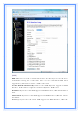
3.5.2 WAN Interface
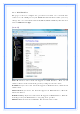
This page is used to configure the parameters for wide area network that
connects to the WAN port of your WLAN Broadband Router. Here you may
change the access method to Static IP, DHCP, PPPoE or PPTP by click the item
value of WAN Access Type.
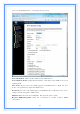
[Static IP]
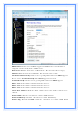
Static IP: Click to select Static IP support on WAN interface. There are IP
address, subnet mask and default gateway settings need to be done.
IP Address: If you select the Static IP support on WAN interface, fill in the IP
address for it.
Subnet Mask: If you select the Static IP support on WAN interface, fill in the
subnet mask for it.
Default Gateway: If you select the Static IP support on WAN interface, fill in the
default gateway for WAN interface out going data packets.
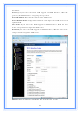
MTU Size: Fill in the mtu size of MTU Size. The default value is 1400.