
User's Manual

8
1.5 LEDs Indication & Connectors of Wireless Router
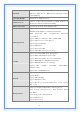
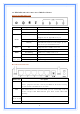
Front Panel LEDs Indication
LED Light Status Description
On Wireless Router is powered on.
PWR
Off Wireless Router is powered off.
On (Steady Green) Reset: When the router is resenting the
configuration, the light will steady on
Slow Blinking Status: System is up and ready.
Status
Flashing WPS: When the router is connecting a pc of
wireless adapter with WPS function.
On WAN port is successfully connected
WAN
Blinking Data is being sent or received.
Slow Blinking WLAN is successfully connected.
WLAN
Blinking
Data is being sent or received.
On LAN port is successfully connected.
LAN
(1, 2, 3, 4)
Blinking Data is being sent or received.
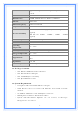
Back Panel Connectors
Button/Port Description
Reset Reset configurations to default. You would use the reset button only
when a program error has caused your Wireless AP router to hang.
Press the button and hold after 6 seconds.
WPS Click WPS button 1 to 3 seconds while you are connecting a PC of
wireless adapter with WPS function (you must enable WPS’ PBC
function).
LAN
(1x, 2x, 3x, 4x)
Ethernet RJ-45 connector, connect to PC with a RJ-45 Ethernet cable.
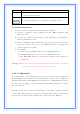
WAN Ethernet RJ-45 connector, connect to WAN access device, such as the