
Operation Manual



CONTROL BOX
12
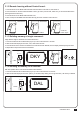
The value can be adjusted by pressing button UP and DOWN. The maximum value is 50(5.0A) and the minimum value is 05(0.5A).
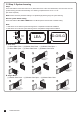
LED display example:
FA-1 Photocell OPEN/CLOSE (Standard set up)
Type of Safety Device
FULLY CLOSED
FULLY OPENED
STOP DURING MOVING
CLOSING
OPENING
PH1
Photocell-CLOSE
No effect
Reload automatic closing time
Reload automatic closing time
Open
No effect
PH2
Photocell-OPEN
Open not allowed
No effect
Open not allowed
No effect
Close
Position of Gate When safety devices are activated
FA-2 Safety Edge
Type of Safety Device
FULLY CLOSED
FULLY OPENED
STOP DURING MOVING
CLOSING
OPENING
PH1
Photocell-CLOSE
No effect
Reload automatic closing time
Open
No effect
Reload automatic closing time
PH2
Safety Edge
Open not allowed
OPEN/CLOSE not allowed
Reverse to open for 2 seconds
Reverse to close for 2 seconds
Position of Gate When safety devices are activated
FA-3 Open Only Device (Vehicle detector)
Type of Safety Device
FULLY CLOSED
FULLY OPENED
STOP DURING MOVING
CLOSING
OPENING
PH1
Photocell-CLOSE
No effect
Reload automatic closing time
Open
No effect
Reload automatic closing time
PH2
Opening Device
Open
Open
Open
No effect
Position of Gate When safety devices are activated
FA-4 Double photocell set up
Type of Safety Device
FULLY CLOSED
FULLY OPENED
STOP DURING MOVING
CLOSING
OPENING
PH1
Photocell-CLOSE
No effect
Open for 2 seconds, when auto closing is ON
Close not allowed
Open
No effect
PH2
Photocell-OPEN/CLOSE
Open not allowed
Close not allowed
Open not allowed
No effect
Stop
Position of Gate When safety devices are activated
7.3 Photocell Logic
Indicate 1.0 ampere: all of the
recorded values will increase 1
ampere as over current value.
Indicate 2.8 ampere: all of the
recorded values will increase 2.8
ampere as over current value.
Indicate 0.6 ampere: all of the
recorded values will increase 0.6
ampere as over current value.