
Operation Manual




CONTROL BOX
6
3). Get Started
3.1 Step 1: Remote Memorizing
3.1.1 Memorizing
Blue LED ON
2 Sec
RF-Learn
Note:
(A) Transmitter memorizing must be done first before system learning.
(B) CHECKING THE Gate MOVEMENTS
1) Release the gearmotor with the release key and move the gate to the middle so that it is free to move in both opening
and closing directions; then lock the gearmotor.
2) Perform the gate opening and closing several times and make sure the gates touches the limit switch at least 2~3 cm
before the mechanical stop.
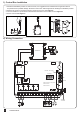
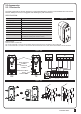
1. Press button RF-Learn on the control board (Figure 1) as many times as the number corresponding to the desired
command, according to the following table, Within 10s, press the desired button on the remote that you want it to be
memorized (figure 1)
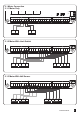
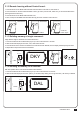
2. Make sure that the LED display shows the “OSC” or “PED” three times quickly. The code is corresponding to the selected
command. (figure 2)
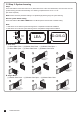
3. Repeat step 1 & 2 within 10s, if there are other remotes to be memorized for the same type of command. No action within
10s, the memorization stage will terminate automatically.
OSC PED
New Remote
(Press A/B button
you selected)
A
B
M1-
Lat-
Lit-Lit+
M2+
M1+Lat+
Q17
K5
K3
K2K1
J4
F1
NC NO
CO
+-
-
NC
- +
CO
NONC
NC NO
CO
+-
-
1 2 3 4 5 6 7 8
(figure 1)
(figure 1)
(figure 2)
Command Message code
1 mes Open-Stop-Close circle LED display “OSC”
2 mes Pedestrian mode LED display “PED”