
Operation Manual


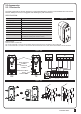


CONTROL BOX
7
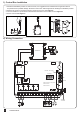
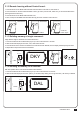
3.1.2 Remote learning without Control board:
1. Press the button on the NEW radio transmitter and hold it down for at least 5s, then release it.
2. Press the button on the OLD radio transmitter 3 times. (Tip: Don’t press too fast; make sure you see the blue flash when
pressing the button each time.)
3. Press the button on the NEW radio transmitter once.
4. Done, at this point the NEW radio transmitter will copy the same command of the OLD one.
3.1.3 Deleting memory of single command:
Single deletion stage is needed for each memorized button.
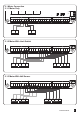
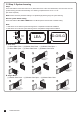
1. Press and hold down RF-LEARN button (Figure 3) on the control board for 5 seconds.
2. Wait until the LED display shows “DKY”, then, within three seconds:
3. Press the button of the remote to be deleted. If the remote has been deleted, the LED display will flash quickly five times.
4. Repeat above steps if more button to be deleted.
3.1.4 Deleting all memory of all remotes:
With this operation all the memorized transmitters will be deleted.
1. Press and hold down RF-LEARN button (Figure 4) on the control board for 10 seconds.
2. Wait until the LED display shows “DAL”. (When you see DKY, keep holding, don’t let go the button.). All memory is deleted.
AC INPUT
12345
1
23456
New Remote
Press the
button again
A
B
A
B
Blue LED OFF
A
B
Old Remote
3 TIMES
A
B
DKY
Blue LED ON
5 Sec
3 Sec
DAL
DONE
RF-Learn
(figure 3)
Blue LED ON
10 Sec
RF-Learn
(figure 4)