
User`s manual

9
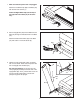
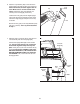
6. Attach a Tray Bracket (105) to the side of the
Right Upright (90) with two #8 x 3/4" Screws (1).
Start both Screws, and then tighten each of
t
hem. Make sure to use the bracket holes
shown. Attach the other Tray Bracket (not
s
hown) to the Left Upright (not shown).
Hold the Fan Tray (30) near the Right Upright
(90). Insert the fan wire through the hole in the
side of the Right Upright and pull it out the top
as shown.
Set the Fan Tray (30) on the Tray Brackets (105)
(only one is shown). The Tray will be attached
in step 11.
1
105
30
90
Fan
W
ire
6
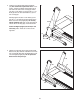
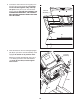
7. With the help of a second person, hold the con-
sole assembly near the Left Upright (89).
Connect the Upright Wire (84) to the console
wire. See the inset drawing. The connectors
should slide together easily and snap into
place. If they do not, turn one connector and try
again. IF YOU DO NOT CONNECT THE CON-
NECTORS PROPERLY, THE CONSOLE MAY
BECOME DAMAGED WHEN YOU TURN ON
THE POWER. Then, remove the wire tie from
the Upright Wire.
Console
Assembly
Console
Wire
Wire
Tie
89
84
84
Console
Wire
7