
Manual



8
Keys
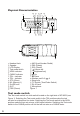
Line Cord and RJ-45 Jack
The MT-8002 Telecom test set is equipped with a standard alligator clip cord,
a RJ-45 to RJ-45 change cord and a RJ-45 to RJ-11 change cord. To use the
cords please nd the RJ-45 jack near the button of the MT-8002 Telecom test set.
The RJ-45 jack is also compatible with RJ-11 plug.
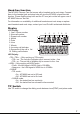
Key Description Function
STO Set and
Storage
Press STO key will enter the setting
mode, there are 6 setting screen on MT-
8002. Please refer to Operation section.
M1 Speed
memory 1
Provide a 16 digits number storage
space
On/off
Hook
On/Off Hook MT-8002 test set
4 directions
key
/ : enter the incoming call list, scroll
the numbers in call list and switch the
setting screen.
: LCD brightness level sesect
: Volume select
RCL Recall To initial a phone call from stored phone
number
DEL Delete Delete the number in list or erase the last
digit from the input number
LNR Last num-
ber redial
Make a phone call for last dialing number
or per-dial number
PSE Pause Insert a PBX pause into the input number
OUT Call out list Enter the dialing out number list
, #,
0~9
Number
keys
Standard Phone number keys