
User's Guide
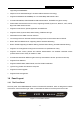
Table Of Contents
- Package Contents
- Chapter 1. Introduction
- Chapter 2. Connecting the Router
- Chapter 3. Quick Installation Guide
- Chapter 4. Configuring the Router
- Appendix A: FAQ
- Appendix B: Configuring the PCs
- Appendix C: Specifications
- Appendix D: Glossary

MR5-WR542G 54Mbps Wireless Router User Guide
5
¾ LAN 1,2,3,4: These ports (1, 2, 3, 4) connect the router to the local PC(s).
¾ WAN: This WAN port is where you will connect the DSL/cable Modem, or Ethernet
¾ Reset button
There are two ways to reset to the router's factory defaults:
1) Use the Factory Defaults function on System Tools -> Factory Defaults page in the router's
Web-based Utility.
2) Use the Factory Default Reset button: First, turn off the router's power. Second, press and hold
the default reset button then turn on the router's power, until the SYS LED lights up (about 3
seconds). Last, release the reset button and wait for the router to reboot.
)
Note:
Ensure the router is powered on before it restarts completely.
¾ .Wireless antenna To receive and transmit the wireless data.