
User's Guide
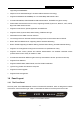
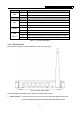
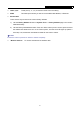
Table Of Contents
- Package Contents
- Chapter 1. Introduction
- Chapter 2. Connecting the Router
- Chapter 3. Quick Installation Guide
- Chapter 4. Configuring the Router
- Appendix A: FAQ
- Appendix B: Configuring the PCs
- Appendix C: Specifications
- Appendix D: Glossary

MR5-WR542G 54Mbps Wireless Router User Guide
4
Name Status Description
Off Power off
PWR
On Power on
Name Status Description
On The router is initializing
Flashing The router is working properly
SYS
Off The router has a hardware error
Off There is no wireless device linked to the router
WLAN
Flashing The Wireless function is enabled
Off There is no device linked to the corresponding port
On There is a device linked to the corresponding port but no activity
WAN,
LAN 1-4
Flashing There is an active device linked to the corresponding port
Table 1-1 The LEDs description
1.4.2 The Rear Panel
The rear panel contains the following features. (View from left to right)
Figure 1-2 Rear Panel sketch
The following parts are located on the rear panel (View from left to right).
¾ Power socket: The Power socket is where you will connect the power adapter. Please use
the power adapter provided with this MR5-WR541GS Wireless Router.