
Quick Start Guide

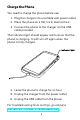
Table Of Contents

Charge the Phone
You need to charge the phone before use:
1. Plug the charger into a suitable wall power outlet
2. Place the phone on a flat, hard, level surface
3. Connect the phone to the charger via the USB
cable provided
The indicator light should appear red to show that the
phone is charging. It will turn o again when the
phone is fully charged.
4. Leave the phone to charge for an hour
5. Unplug the charger from the power outlet
6. Unplug the USB cable from the phone
For troubleshooting hints and tips, go online to
https://docs.puri.sm/Librem_5/Troubleshooting.html
5