Power on the Phone
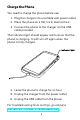
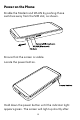
Enable the Modem and WLAN by pushing those
switches away from the SIM slot, as shown.
Ensure that the screen is visible.
Locate the power button.
Hold down the power button until the indicator light
appears green. The screen will light up shortly after.
6