
MP3 Player User Manual


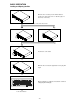




-
14
-
BEFORE SWITCHING OFF THE POWER
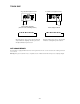
When you have finished using the CD player, before switching off the power, ensure that the disc is ejected
Do not switch off the power when the
disc in the loader.
POWER OFF
Switch off the power after the disc is
ejected.
POWER OFF
TROUBLESHOOTING GUIDE
If difficulties a rise with yo ur c omp act disc player, lo cate the app arent p ro blem in the left-hand c olumn of the ta ble and follow the
co rrec tive action sugg ested in the right-hand co lumn.
1. Is the compact disc p layer p ro pe rly c onnected to the a mplifier?
2. Is the amplifier set for the prop er opera tion?
3. Have the ope ra ting instructions for the co mpact disc p layer been fo llo wed ?
Symptom Possible Cause Corrective Action
The power fails to switch on
when the POWER switch is set
to ON
Poor power plug connection at the AC outlet. Insert the power plug firmly into the AC outlet.
Disc play does not start
The disc is loaded upside down.
The disc is too dirty.
Reload the disc with the label side up.
Clean the disc.
No sound
Improper output cable connections.
Improper amplifier operation.
Connect the output cable properly.
Make sure that the amplifier c ontrols are set
properly.
Sound skips
The CD player is subject to vibrations or
physical shock.
Change the installation location.
Hum Loose cable connections. Firmly connect all audio plugs.