
INSTRUCTION MANUAL LCD Monitor PLHR7SP

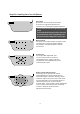

Notice:somefunctionsworkbyremotecontrol.
Power On/Off
Turn On / Off the monitor
V1/V2
Select Video 1 or Video 2 Input
Volume
Adjust reduce headphone output
volume
Reduce
Menu
This button brings up the on-screen
menu for adjustment of a range of
monitor parameters such as,
vol, con, col, bri, tint. Etc
Preset
Picture preset by factory
Adjust Increase
This multipurpose button serves to
adjustdownto selectmenu function
and increase the selected parameters
such as contrast,color,brightness etc
Invert
To adjust the picture
up/down/left/right
Adjust Decrease
This multipurpose button serves to
adjust up to select menu function
and decrease the selected parameters
such as contrast, color, brightness etc.
VolumeIncrease
Adjust increase headphone output
volume
Mute
Press to Mute the sound, press again
to restore the previous volume level
When you use a wireless radio or portable telephone near
this unit, picture or sound interference may occur. Do not
use such devices near this unit.
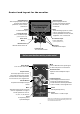
Controlandlayoutforthemonitor
4
Menu
This button brings up the on-screen
menu for adjustment of range of
monitor parameters such as, volume,
brightness, color, contrast, tint
Adjust Increase
This multipurpose button
serves to increase the selected
parameters, such as volume,
contrast etc.
Remote Sensor
Remote control sensor IR
Power On / Off
Turn on/off the monitor
Adjust Decrease
This multipurpose button serves
to decrease the selected
parameter, such as volume,
contrast, etc.
Power Cord
(Male)
V1/V2
to select Video input
Blue screen when
no video signal
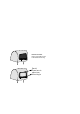
Front Video Input
Front video input
(open the speaker cover)
IR Sensor
Infra RedAudio Output
FrontAudio Input
Front L & R audio input
(open the speaker cover)