
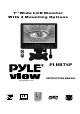
INSTRUCTION MANUAL LCD Monitor PLHR7SP

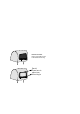

PULLOUT
PUSHIN
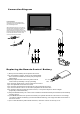
ReplacingtheRemoteControlBattery
1)Alwaysusenewbatterywhenreplacetheoldset.
2)Donotattempttocharge,short-circuit,disassemble,
heatorburnusedbatteries,batterymaybeexplode
ifmistreated.
3)Batteryreplacementisnecessarywhenremote
controlactssporadicallyorstopsoperating.
4)Donotdrop,applyshockorstepontheremotecontrol.
5)Donotspillwaterontheremotecontrol.
6)Donotplaceobjectsbetweentheremotecontrolandremotesensor.
7)Donotuseremotecontrolfortheotherequipmentsatthesametime.
8)Donotleavetheremotenearanyheatsources,orinaplacesubjecttodirectsunlight
(especiallyonthedashboard).
9)Keepthelithiumbatteryoutofthereachofchildren.Shouldthebatterybeswallowed,immediately
consultadoctor.
10)IftheMONITORdoesnotoperateevenwhenyouoperatetheremotecontrolfromacloserange,
itistimetoreplacethebattery(useCR-2025lithiumbattery),referringtothelabelonthebackof
thebasiccontrol.
11)Donotholdthebatterywithmetallictweezers,otherwiseashort-circuitmayoccur.
6
ConnectionDiagram
Fuse
(2A)
Fuse replacement
Never use fuse with an amperage rating
exceeding the one supplied with the unit as
this could damage the unit.
When replacing the fuse, be sure to use one
that matches the amperage described on the
original fuse. If the fuse blows, check the
power connection and replace the fuse. If the
fuse blows again after replacement, there may
be an internal malfunction. In such a case,
consult your nearest your’s dealer.
1
2