
User manual
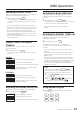
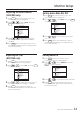


VIDEO MENU
BRIGHT
CONTRAST
COLOR
TINT
MUTE
AUDIO CH
MIRROR
REVERSE
LANGUAGE
RESET
EXIT
Seat Back Monitor
13
Adjusting Picture
The video menu on DVD mode will be different with
AV2, AV3 and AV4 mode.
‧
‧Make adjustments within 10 seconds, otherwise the
OSD (On Screen Display) will turn off automatically.
DVD
Bright, Contrast, Mute, Audio CH, Mirror,
Reverse, Language, Reset and Exit are
adjustable.
AV2 / AV3
Bright, Contrast, Color, Tint, Mute, Audio CH,
Mirror, Reverse, Language, Reset and Exit are
adjustable.
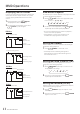
1.Press button on the remote control. The
picture setting menu is highlighted.
2.Select and Press “EXIT”or wait 10 seconds until
OSD disappear, the adjustment will be saved
automatically.
Each source is independently adjustable.
OSD
VIDEO MENU
BRIGHT
CONTRAST
MUTE
AUDIO CH
MIRROR
REVERSE
LANGUAGE
RESET
EXIT
Monitor Setup
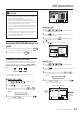
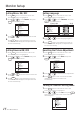
Adjusting the Bright
1.Press button on the remote control.
The picture setting menu is highlighted.
2.Press or to select BRIGHT, then press
. to confirm a selection.
3.Press or to adjust the brightness.
Bright can be adjusted from 0 (MIN) to 100(MAX).
4.Press again to save adjustment or wait 10
seconds until OSD disappear, the adjustment will
be save automatically.
OSD
OSD
OSD
VIDEO MENU
BRIGHT
COLOR
TINT
MUTE
AUDIO CH
MIRROR
REVERSE
LANGUAGE
RESET
EXIT
CONTRAST
50
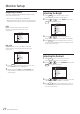
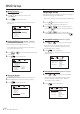
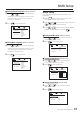
Adjusting the Contrast
1.Press button on the remote control.
The picture setting menu is highlighted.
2.Press or to select CONTRAST, then press
to confirm a selection.
3.Press or to adjust the contrast. Contrast
can be adjusted form 0(MIN) to 100(MAX).
4.Press again to save adjustment or wait 10
seconds until OSD disappear, the adjustment will
be save automatically.
OSD
OSD
OSD
50
VIDEO MENU
BRIGHT
COLOR
TINT
MUTE
AUDIO CH
MIRROR
REVERSE
LANGUAGE
RESET
EXIT
CONTRAST