
Operation Manual

A
Prog A
%
STA
V. SET WATER BUDGET
(Modify the water application).
Icon : percentage sign
The SUPER IMAGE controller has a Water Budget function used to adjust watering time for each program from 0 to 200
% without re-setting the watering time for each station.
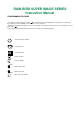
Press the
key until this display appears :
Use the A/B key to select the program you wish to water budget. In the
above example, it is program A.
Use the +/ON and -/OFF keys to set the water budget in increments of 10 %.
100 % is the starting point. The duration in this case will be what you have
already programmed.
To reduce the watering time, use the -/OFF key.
Example : “80” in the display means you have reduced the watering time by
20 % on all stations. An initial duration of 10 minutes which you previously
programmed will now be cut to 8 minutes. Use the +/ON key to increase the
watering time.
Note : make sure that the increase in watering time does not result in program overlap.
%
VI. MANUAL SINGLE STATION START
Icon : hand + STA
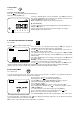
Repeatedly press the
key until this display appears :
The station number appears at the left of the display (example: station 1).
Repeatedly press the key until the desired station number appears.
In our example, now press the +/ON key to manually start station 1. The
sprinkler in the display begins to “water”.
Blinking stream
The watering time appears in the display. The remaining watering time is
counted down. If you press the key while a station is watering, the controller
will move to the next station and begin watering. If you wish to stop watering
before the scheduled duration is up, press the -/OFF key. The stream
disappears. Only the station number appears.
Note : water budgeting does not operate in the manual single station mode.
IV. SET THE LENGTH OF WATERING TIME PER STATION
Icon : hour-glass
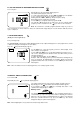
Repeatedly press the key until this display appears :
The station number appears at the left.
To set the station watering time, use the +/ON and -/OFF keys. The duration
is set in 1 minute increments from 0 minutes to 12 hours.
Holding down the +/ON or -/OFF keys will speed up the setting.
Each station must be assigned to a program.
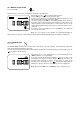
Use the A/B key to assign the station to program A or B.
The letter A or B will appear at the right of the screen to indicate which
program you have selected. Press the key to move to the next station.
Note : Be careful not to schedule programs that will overlap. If you do not
leave enough time for all the stations to water, the controller will simply delay the second start time until the previous
cycle is completed.
STA