
Operation Manual

CYC
Prog A
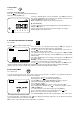
VII - MANUAL CYCLE START
Icon : hand + CYC
Remember that a cycle consists of all stations operating in sequential order.
Repeatedly press the
key until this display appears :
Use the A/B key to select the cycle you wish to start.
You may select either the cycle in program A or B. The program you select
appears in the upper lefthand corner of the display.
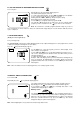
To start the cycle press the ON key. The blinking sprinkler stream appears in
the display. Station 1 appears and the watering time is counted down. Then
station 2 appears and its watering time is counted down. The rest of the
stations with programmed water time appear in sequence until the cycle is
completed.
If you wish to shut off a manual cycle, press the OFF key. The display will
now show the time of day.
Note : If a cross appears on the sprinkler, (see following paragraph) no
manual start is possible. Even if the display shows the sprinkler with the blinking stream, no irrigation can take place.
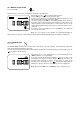
VIII. SYSTEM ON / OFF
Icon : cross
The SUPER IMAGE controller has a function which either allows or prevents irrigation. The default mode is On which
allows the programmed watering to take place.
You can prevent watering (rainy weather shutoff) without changing the scheduled watering cycle. Repeatedly press the
key until this display appears.
Note that the cross on the sprinkler blinks. To prevent watering press the
-/OFF key and the cross stops blinking.
If you move through the menu by pressing the
key, you will see the
non-blinking cross appears on all the displays except the one above. No
watering, either automatic or manual, will take place. To return to the
watering mode, repeatedly press the
key until the display with the
blinking cross appears. Now press the +/ON key. The cross disappears.
Note : In the manual OFF mode, the LED lamp on the front panel is red
CYC