
User manual


Version: 2.0
39
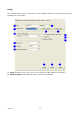
3. Country Region Code: eight countries to choose. Country channel list:
Classification Range
0: FCC (Canada) CH1 ~ CH11
1: ETSI CH1 ~ CH13
2: SPAIN CH10 ~ CH11
3: FRANCE CH10 ~ CH13
4: MKK CH14 ~ CH14
5: MKKI (TELEC) CH1 ~ CH14
6: ISRAEL CH3 ~ CH9
7: ISRAEL CH5 ~ CH13
Note: Country Region code is not support for Vista.
4. Beacon (ms): The time between two beacons. System default is 100 ms.
5. TX Power: Manually force the AP transmits power. System default is 100%.
6. Idle Time: Manually force the Idle Time using selected value. Default is 300.
7. Channel: Manually force the AP using the channel. System default is channel 1.
8. Use Mac Address: Use MAC address of used wireless card to be AP name. System default is
APX (X is last number of Mac Address).
9. Security Setting: Authentication mode and encryption algorithm used within the AP. System
default is no authentication and encryption.
10. No forwarding among wireless clients: If there is no beacon among the wireless clients,
they can’t share information with each other.
11. Hide SSID: Prevent this AP from recognized in wireless network. This is disabled as default.
12. Allow BW40 MHz: Allow BW40 MHz capability.
13. Default: Use system default value.
14. Cancel: Cancel the above changes.
15. Apply: Apply the above changes.