
User's Manual



10
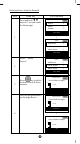
Deleting Device from the Network
Step Setup Key LCD Indication
1
Press and hold
ef
keys for 3 seconds under
the Home page.
⇓
2
Select “Delete
Device".
3
Press
key to delete
the device from Z-Wave
network.
4
Press the program button
on the target device.
⇓
Home
Device >
Scene >
Comfor
t
>
OK to Enter
Setup
Add Device >
Delete Device >
Add to Scene >
OK to Enter
Delete Device
Press PROG on tar
g
e
t
>>>>
Savin
g
Data …
Delete Device
Press PROG on tar
g
e
t
>>>>
O
K
Delete Device
Press PROG on target
>>>>
Setup
Add Device >
Delete Device >
Add to Scene >
OK to Enter