
User's Manual



6
ZRC-100 Operations
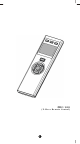
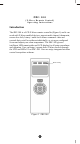
Welcome to the world of Z-Wave home automation, your ZRC-100
will be able to control all the Z-Wave products around your house. The
following section will guide you through the set up processes for your
ZRC-100.
Please note that all Z-Wave devices, light switches, dimmers, shutter
switches, thermostat and secure door lock made from various vendors
are compatible with your ZRC-100 as long as they carry the Z-Wave
logo:
(Please carefully read through the following then store the manual for
future reference.)
Before using the ZRC-100, please install the batteries:
• 4xAAA batteries are required for operation.
• Remove the battery cover on the back of your remote.
• Check the polarity of the batteries and the "+/-" marks inside the
battery compartment.
• Insert the batteries.
• Push the battery cover back in place.
L CAUTION (battery safety)
− Use new batteries of the recommended type and size only.
− Never mix used and new batteries together.
− To avoid chemical leaks, remove batteries from the remote
controller if you do not intend to use the remote for an
extended period of time.
− Dispose of used batteries properly; do not burn or bury them.